1. Introduction to Computer System
The word computer is derived from the Latin word Computare, which means to calculate. A computer is an electronic and programmable device that accepts raw data as input, processes it according to a given set of instructions, produces meaningful information as output, and stores the results for future use.
In the modern world, computers are used everywhere such as homes, schools, offices, hospitals, banks, industries, and research centers. Due to their speed, accuracy, storage capacity, and versatility, computers have become an inseparable part of daily life.
2. Features (Characteristics) of a Computer
a) Automatic
A computer works automatically once instructions are given through software. After starting a task, it completes the work without human intervention.
b) Speed
A computer processes data at a very high speed. It can perform millions of instructions per second. Processing speed is measured in units like millisecond, microsecond, nanosecond, and picosecond.
c) Accuracy
A computer produces accurate results if correct data and instructions are given. Incorrect input leads to incorrect output, which is called GIGO (Garbage In Garbage Out).
d) Storage
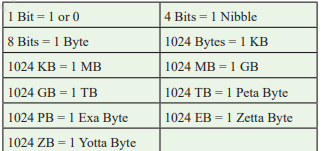
A computer can store a huge amount of data, programs, and information for a long time. Storage capacity is measured in bits, bytes, KB, MB, GB, TB, etc.
e) Diligence
A computer can perform repetitive tasks continuously without losing speed or accuracy. Due to this quality, computers are used in factories and quality control systems.
f) Versatility
A computer is a versatile machine because it can perform different kinds of tasks such as calculation, designing, communication, entertainment, and research.
3. Functions of a Computer (IPOS Cycle)
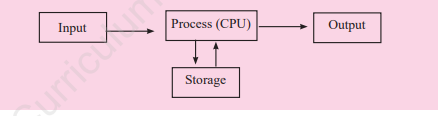
A computer works on the IPOS cycle:
Input: Entering raw data into the computer
Process: Processing data inside the CPU
Output: Displaying meaningful information
Storage: Storing data and information for future use
4. Application Areas of Computer Systems
a) Education
Computers are used for teaching, learning, online classes, exams, result processing, and maintaining student records.
b) Communication
Computers help in sending emails, video calls, chatting, social networking, and video conferencing.
c) Banking
Computers are used for online banking, ATM services, account management, fund transfer, and security.
d) Medicine
Computers help in diagnosis, patient records, medical imaging, surgeries, and medical research.
e) Entertainment
Computers are used for games, movies, music, animation, video editing, and social media.
f) Scientific Research
Computers are used for weather forecasting, space research, data analysis, and simulations.
g) Agriculture
Computers support precision farming, crop monitoring, weather analysis, and smart agriculture.
5. Input Devices
Input devices are used to enter data and instructions into a computer system.
Common Input Devices:
- Keyboard
- Mouse
- Scanner
- Microphone
- Webcam
- Joystick
- Touchscreen
- Touchpad
6. Central Processing Unit (CPU)
The CPU is known as the brain of the computer. It processes data and controls all operations of the computer system.
Functions of CPU:
- Fetching instructions
- Decoding instructions
- Executing instructions
- Storing results
Components of CPU:
Control Unit (CU): Controls all operations
Arithmetic Logic Unit (ALU): Performs arithmetic and logical operations
Registers: Store temporary data and instructions
7. Motherboard and Data Bus
The motherboard is the main circuit board of a computer. It connects all hardware components and allows communication between them.
The data bus is a communication pathway that transfers data between CPU, memory, and peripherals.
8. Computer Memory
Computer memory stores data and instructions.
Types of Memory:
a) Primary Memory
- Directly accessed by CPU
- Faster but limited storage
- Types: RAM and ROM
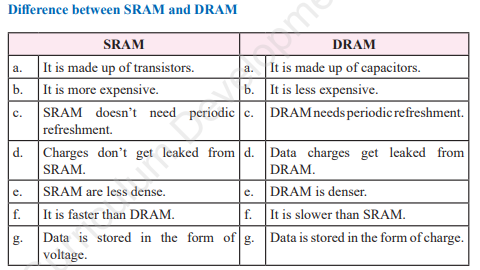
RAM: Volatile, temporary, read-write memory
SRAM (fast, expensive)
DRAM (slower, cheaper)
ROM: Non-volatile, permanent memory
PROM
EPROM
EEPROM
b) Secondary Memory
Non-volatile
Large storage capacity
Examples: Hard Disk, SSD, CD, DVD, Pen Drive, Cloud Storage
Primary MemorySecondary Memorya. Primary memory is considered as the main memory of a computer system.a. Secondary memory is also known as auxiliary or backup memory.b. It can directly communicate with the CPU.b. Secondary memory indirectly communicates with the CPU.c. The storage capacity of primary memory is less than secondary memory.c. The storage capacity of secondary memory is higher than primary memory.d. Primary memory is faster than secondary memory.d. Secondary memory is slower than primary memory.e. They are more expensive.e. They are less expensive.f. Information stored in primary memory cannot be moved from one place to another.f. Information stored in secondary memory can be transferred from one computer to another.g. Data and instructions to be currently executed are stored in Primary memory.g. Data and information to be stored permanently are kept in secondary memory.h. Primary memory can be both volatile and non-volatile.h. Secondary memory is non-volatile in nature.i. Primary Memory has faster access time.i. This memory has low access time.j. Examples: RAM, ROM, Cachej. Examples: Pen drive, CD, Hard Disk.
9. Storage Devices
Hard Disk (HDD)
A hard disk is a popular storage device that holds enormous amounts of data indefinitely. It is constructed with aluminum materials and coated with a ferromagnetic element. Its surface consists of circular metal discs, or platters, which rotate while data is written or read. It offers substantial storage capacity and is measured in revolutions per minute (rpm) for speed, typically ranging from 5400 to 7200 rpm
SSD (Solid State Drive)
Nowadays, hard disks are quickly being replaced by SSD (Solid State Drive) due to their faster performance, lower latency, and increased reliability. SSDs use semiconductor chips to store data, offering quicker read and write speeds compared to hard disks. Despite being more expensive, SSDs are preferred in devices like laptops, notebooks, and ultrabooks for their enhanced performance
Optical Discs
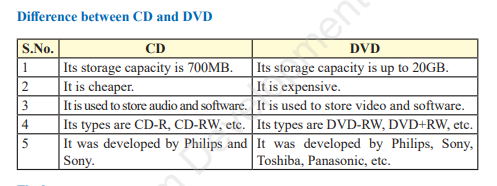
An optical storage disc is a disc that uses laser light technology to store and retrieve data. The most commonly used optical storage discs are CDs, DVDs, Blu-ray disks, etc.
Flash Memory & Pen Drive
Portable, non-volatile memory devices.
Cloud Storage
Cloud storage refersto the online storage of data on remote servers accessed over the Internet. It allows users to upload, access, and manage their files and data from anywhere with an Internet connection. Third-party companies like Dropbox, Google Drive, Microsoft OneDrive, and Amazon S3 provide cloud storage services. These services let you change the amount of storage you use. Cloud storage is useful because you can access it from different devices, it syncs automatically, and it can be cheaper than traditional storage methods.
10. Output Devices
Output devices display processed information.
Monitor
A monitor displays output in visual form.
Printer
A printer produces hard copy output on paper.
Speaker
Speakers produce sound output.
Common Output Devices:
Monitor (LCD, LED)
Printer (Laser, Inkjet, Dot Matrix, 3D Printer)
Speaker
11. Peripheral Devices and Ports
Peripheral devices enhance computer functionality.
Common Ports:
USB
Type-C
HDMI
VGA
Ethernet
Audio Port
12. Computer Software
Computer software refers to a set of instructions, programs, or data that enable a computer to perform specific tasks or functions.
Types of Software:
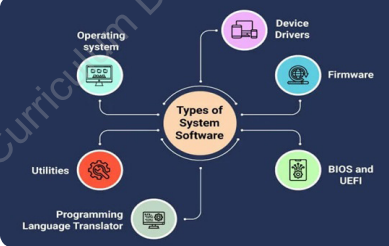
a) System Software
Operating System: Operating system software is the system software that controls and manages the overall operation of a computer just like a traffic policeman controls the traffic on the road. It is the basic requirement of a computer. It is the first software that is loaded into the computer memory (RAM) when you switch a PC on and works till you shut down the computer.
Language Processor: A language processor (also called translator) is system software that translates programs written in assembly language or high level language into machine language.
Utility Software: Utility software is the helpful software that performs specific tasks related to the maintenance of computer hardware and data. It helps to keep a computer in a smooth functioning condition
Device Drivers: A device driver is a set of programs that is designed to control and manage the specific device. The device drivers make the devices usable
b) Application Software
Application software refers to programs tailored to meet specific user needs. This collection of programs is crafted to perform distinct tasks such as composing emails, editing photos, creating presentations, listening to music, engineering design, video editing, billing, and more. Packaged Software and Customized (or Tailored) Software are two types of application software.
Packaged Software: Packaged software is the readymade software developed for all general users to perform their generalized tasks. Software companies like Microsoft ,Adobe, Dropbox, Corel, Oracle, Google, etc., use to develop packaged software
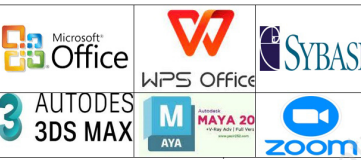
Customized Software: Customized (Tailored) software is the application software which is designed to fulfill the specific requirements of an organization, office or individual.
Open Source vs Proprietary Software
Open source software is a type of software that allows its source code to be publicly accessible. It means anyone can view, modify and use the code freely. Linux, Apache, Audacity, OpenOffice, Android and others are open source software.
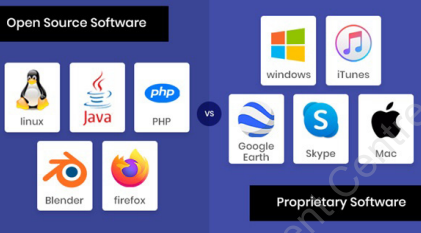
Differences between Open-source Software and Proprietary Software
Open-source softwareProprietary softwareOpen Source Software refers to the software in which users can view the source code which is freely available on the Internet.Proprietary Software refers to the software that uses the proprietary and closely guarded code. Users cannot view the source code.The code can be copied, modified, or deleted by other users and organizations.Only the original authors of the software can access, copy, and alter that software.Open source software is freely available on the Internet or users have to pay a nominal amount of fee to use Open Source Software.Proprietary Software is also known as Licensed or Closed Source Software and users have to buy a license to use Proprietary Software.There is very little security because anyone can view and modify the source code and because of availability, the source code is open for hackers to practice on.Proprietary software can be fixed only by a vendor as its source code can only be accessed by the person, team, or organization who created it and maintains exclusive control over it.
Comparison between the features of system and application software
System softwareApplication softwareIt is designed to manage the resources of the computer system, like memory, I/O device process management, security, etc.It is designed to fulfill the requirements of the end user for performing day-to-day tasks.It is designed by writing programs in low-level language like machine-level language or assembly language.It is designed by using high-level language and 4GL.It executes when the system is powered on and runs until the system is powered off.It executes according to the user’s needs. It executes when the user starts and terminates when the user closes it.It is installed on the computer system at the time when the operating system is installed.It is installed as per the user’s requirements.It is capable of running independently.It cannot run independently without system software.It is independent of the application software,It needs system software to execute.It is crucial for the effective functioning of a system.It is not extremely important for the functioning of the system.
Mobile Applications
Definition: Apps designed for specific purposes, installed on smartphones, tablets, or smartwatches.
Purpose: Perform various tasks such as gaming, productivity, social networking, and navigation.
Features: Built to work with device-specific hardware like touchscreens, GPS, cameras, and mobile networks.
Operating Systems: Examples include Android and iOS, which manage device hardware and software.
Web Applications
Definition: Software programs that run on web servers and are accessed through web browsers over the internet.
Access: No installation required; used directly via a web page interface.
Examples: Gmail, Google Docs, Facebook.
Advantage: Can be used on any device with a browser and internet connection, offering cross-platform convenience.
Key Difference
Mobile apps are installed locally and designed for mobile devices.
Web apps are accessed online through browsers and do not require installation.