1. Introduction
Computer technology has become a part of everyday life. From big computers to smartphones, every device connects us to a global network of information. Most computers today are linked through the Internet, forming a vast virtual world called cyberspace.
As usage increases, threats also increase. Cybercriminals attempt to steal data, money, and resources. Therefore, computer security is necessary to protect:
Data and information
Programs and applications
Credentials (username & password)
Hardware devices
1.3.1 Information Security
Information security means protecting data while storing, processing, sharing, or transferring it.
A. Securing Stored Data
Data can be lost due to:
- Accidental deletion
- Hard disk crash
- Computer damage (fire, flood, theft)
Methods to Protect Data
- Regularly check and replace hard disks if faulty
- Make backup copies on another disk
- Use cloud storage (Google Drive, OneDrive, iCloud, Dropbox)
- Email important files to yourself
- Use passwords to protect files and folders
B. Security Threats (Cyber Security Threats)
1. Phishing
Fake attempts to steal sensitive details like passwords or credit card info by imitating trusted websites. Often done through emails, fake websites, or harmful links.
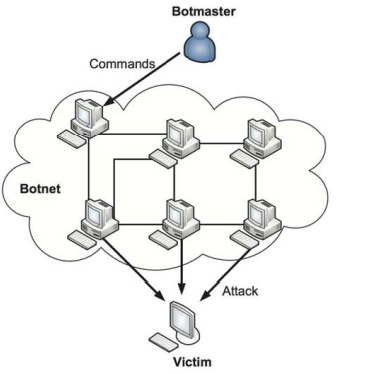
2. Botnet
A group of infected computers controlled by a hacker. Each infected device is called a bot. It is often used for attacks or illegal activities.
3. Rootkit
A hidden malicious program that gives a hacker full administrator control of the computer while hiding its presence.
4. Keylogger
A tool (hardware or software) that secretly records every key typed on a keyboard. Used to steal passwords & personal information.
5. Hacker
A skilled computer expert who breaks into systems. Types:
White hat: ethical hacker
Black hat: criminal hacker
Grey hat: in-between
6. Drive-By Attack
Malware gets installed simply by visiting an infected website. No clicking is required. Happens due to outdated apps or browsers.
C. Malicious Codes
Malicious codes create vulnerabilities, allowing hackers to access systems.
Forms include:
- Java Applets
- ActiveX controls
- Plug-ins
- Scripts
They can steal data or destroy files.
1.3.2 Security Mechanisms
1. Authentication System
Process of identifying a user using username + password.
a) Password
A memorized secret used to confirm identity.
Strong password tips:
- Never share credentials
- Don’t use easily guessable words
- Use a mix of letters, numbers & symbols
- Use different passwords for different sites
- Change passwords regularly
b) Biometric
Uses biological features like fingerprints, face, or retina scanning. More secure than regular passwords.
c) Firewall
A security system that monitors and controls traffic between the Internet and a private network. It blocks unauthorized access.
Types:
- Hardware firewall
- Software firewall
- OS-based firewall (Windows firewall)
d) Cryptography
Technique to secure communication so only intended users understand it.
Types:
i. Encryption
Converts data into unreadable form using a key.
ii. Decryption
Converts encrypted data back to original form.
2. Malware (Malicious Software)
a) Virus
A program that replicates itself, infects files & spreads to other computers.
b) Spyware
Secretly collects information without user’s knowledge. Often includes keylogging.
c) Trojan
A program that looks harmless but contains hidden malicious functions. Creates backdoors.
d) Worm
Spreads across networks automatically using security holes. Very fast-spreading.
e) Adware
Displays unwanted ads on the computer, usually through pop-ups.
1.3.3 Antivirus Software
Antivirus software detects, prevents, and removes malware. Modern antivirus can stop:
- Viruses
- Worms
- Trojans
- Spyware
- Adware
- Phishing attacks
- Malicious links
- Popular antivirus:
- Norton
- Bitdefender
- Kaspersky
- ESET NOD32
- Webroot
Updates are essential because new malware appears every day.
1.3.4 Backup System
Backup means copying data to another safe location.
Importance:
- Protects against accidental deletion
- Protects from hardware failure
- Helps recover data after corruption
- Backup storage:
- Hard disks
- External drives
- CDs/DVDs
- Cloud storage
1.3.5 Hardware Security
Hardware can be damaged by:
Dust
Moisture
Irregular electricity
Overheating
Fire
Theft
Protection Measures
i. Regular Maintenance
- Clean dust and dirt
- Fix loose connections
- Replace faulty devices
ii. Insurance
Covers loss of hardware from theft or disasters.
iii. Keep Free From Dust
Dust can block fans and cause overheating.
iv. Fire Extinguishers
Install fire extinguishers in computer rooms.
v. Theft Protection
Use locks, guards, or biometric access.
vi. Air Conditioning
Maintains temperature in rooms with heavy computer use.
vii. Power Protection Devices
Use:
Stabilizers
Spike controllers
UPS
UPS prevents loss of unsaved data during power cuts.
Summary (Short Exam Points)
- Cloud storage allows online storage of data.
- Phishing steals sensitive info through fake links/emails.
- Keylogger secretly records keystrokes.
- Hacker is a skilled person who breaks into systems.
- Malicious code creates vulnerabilities.
- Authentication identifies users, usually with username & password.
- Password must be strong and secure.
- Biometric authentication uses biological traits.
- Firewall controls incoming and outgoing network traffic.
- Cryptography secures communication.
- Encryption changes data into unreadable form.
- Decryption changes data back to readable form.
- Malware includes viruses, spyware, worms, trojans, adware.
- Spyware collects info secretly.
- Backup protects data from loss.
- Hardware security includes dust control, maintenance, insurance, fire safety & power protection.