Information and Communication Technology (ICT)
Introduction to Television Technology Evolution
Three Types of Television Systems
1. Antenna TV (Traditional)
- Oldest technology
- Signal Type: Analog signals received through antenna
- Audio-Visual Quality: Poorest among all three types
- How it works:
- Waves emitted from transmitter travel through air
- Energy is lost to surroundings during transmission
- Less potential difference (p.d.) generated on antenna
- Weakened electrical current in antenna wire
- Current acts as modulated signal for TV broadcasting
2. Cable TV
- Technology: Cable-based transmission
- Signal Type: Modulated analog signals through wires
- Components:
- Cable splitter
- Cable modem (needed to use computer as TV)
- Quality: Better than antenna TV
- Popularity: Very popular before Dish TV
3. Dish TV (Satellite TV)
- Modern technology
- Signal Type: Digital signals received from satellite
- Quality: Best audio-visual quality
- Current Status: Has replaced traditional TV systems
Signal Conversion Process
In All TV Systems:
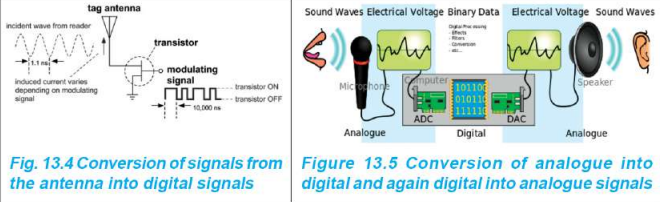
- Signals must be converted to digital signals by internal TV circuits
- Digital signals transmit audio-visual content
- For viewing: Digital signals → Analog signals (visible and audible)
Necessity: Device needed that can:
- Convert analog signals to digital signals (ADC)
- Convert digital signals back to analog signals (DAC)
Digital Signals
Activity 13.1: Understanding Digital Signals
Setup:
- 5V AC source + bulb + switch + conducting wire
- Switch ON → 5V potential difference → High signal (1)
- Switch OFF → 0V potential difference → Low signal (0)
Observation:
- Switching creates on-off signals
- Graph shows discrete voltage levels (0V or 5V)
- This is a digital signal
Definition of Signal
Signal: A physical quantity that changes with time
Digital Signal Characteristics
Representation:
- Only two digits: 0 and 1
- Uses binary system
- Combination of binary digits represents digital signals
Examples:
- 1 binary digit: 0 or 1 (2 combinations)
- 2 binary digits: 00, 01, 10, 11 (4 combinations)
- 3 binary digits: 000, 001, 010, 011, 100, 101, 110, 111 (8 combinations)
Visual Representation:
- Square wave pattern
- Discrete levels (0V or 5V)
- Sudden transitions between levels
- No intermediate values
Analog Signals
Definition
Analog Signal: A signal that indicates constantly changing physical quantity
Characteristics
- Continuously changes with time
- Sine wave pattern
- Smooth transitions
- Range: Example: -5V to +5V
- Has peaks (maximum positive) and valleys (maximum negative)
Example
If switch in Activity 13.1 was never turned off:
- Voltage increases and decreases continuously
- Creates smooth sine wave
- This is an analog signal
Computer Memory and Storage
Data Storage in Computers
- Digital signals indicate different data
- Data stored in computer memory
- Can store permanently in large amounts
- Formats: Text, graphics, audio, video
Important Terms
Bit (Binary Digit):
- Smallest form of data on computer
- Can be either 0 or 1
Byte:
- Group of eight bits
- Works as single unit of data in computer
Comparison: Digital vs Analog Signals
FeatureAnalog SignalDigital SignalDefinitionConstantly changing physical quantityPhysical quantity changing in segmentsTime VariationChanges continuouslyChanges by two fixed valuesWave FormSine waveSquare waveVoltage RangeExample: -5V to +5VExample: 0V or 5VConverterADC (Analog to Digital Converter)DAC (Digital to Analog Converter)Example DeviceTemperature sensor (analog input)Playing music on computer (digital to analog)Signal Transmission
Definition
Signal Transmission: The process of signal transformation through a medium or channel
Types of Signals Used
Analog Transmission (Traditional):
- Sound waves used in communication
- Landline phones use analog signals through wires
- Radio broadcasts (medium wave, short wave)
Problems with Analog Transmission:
- External effects (mixing of other waves)
- Atmospheric interference
- Signal becomes unclear
- Security issues (illegal recording possible)
- Signal distortion
Digital Transmission (Modern):
- Analog signals digitalized using various technologies
- Makes signals more clear and distinct
- Data doesn't change
- Better protection and security
Advantages of Digitalization
- Signals remain clear
- Data can be stored, transmitted, and recreated using 0s and 1s
- Data processing is easier
- Very low possibility of error
Components of Digital Communication System
Complete Process Flow
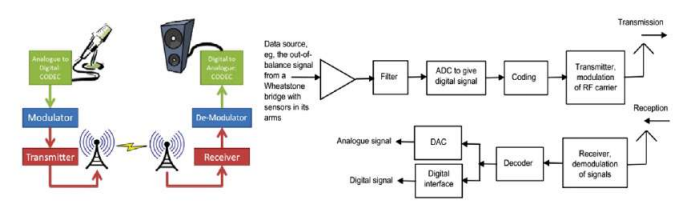
Transmission Side:
- Source → 2. Input Transducer → 3. Encoder → 4. Modulator → 5. Channel
Reception Side: 6. Channel → 7. Demodulator → 8. Decoder → 9. Output Transducer → 10. Output Signal
Detailed Explanation of Each Component
(a) Source
- Origin of signal
- Example: Sound waves, analog signals
(b) Input Transducer
- Function: Converts received signals into electrical signals
- Example: Microphone converts sound into electricity
(c) Encoder
- Function: Compresses data to minimum number of bits
- Purpose: Effective utilization of available frequency range (Bandwidth)
(d) Modulator
- Function: Modulates data to be transmitted by carrier
- Process: Converts digital signals to analog signals for transmission
- Directs signals to channel/medium
(e) Channel (Medium)
- Function: Provides pathway for analog signals
- Connects transmitter to receiver
(f) Demodulator
- Location: First step at receiver side
- Function: Demodulates received signal
(g) Decoder
- Function: Re-digitizes demodulated signals
- Purpose: Removes possible errors in final output
(h) Output Transducer
- Function: Converts decoded signals to original physical signal
- Changes electrical signals to physical output
- Example: Loudspeaker converts current to sound
(i) Output Signal
- Final result of overall transmission process
- Example: If input was sound waves, output is sound waves
Types of Transmission
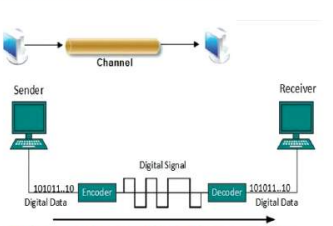
Baseband Transmission
Definition: Transmission of digital signals through channels WITHOUT conversion to analog signals
Characteristics:
- Sending and receiving done simultaneously in same channel
- Used for short-distance transmission
- Direct digital signal transmission
- Example: Connecting two computers with cables
Process Flow:
Digital Data → Encoder → Channel → Decoder → Digital Data (101011...) (101011...)
Broadband Transmission
Definition: Transmission of digital signals AFTER converting to analog signals
Common Usage: "Broadband internet" = High-speed internet
Characteristics:
- Requires modulation
- Used for long-distance transmission
- Analog signals transmitted as optical or electromagnetic waves
- Various transmission frequencies available
Channel Configuration:
- Two separate channels for sending and receiving, OR
- Two separate cables
Modulation Types (for digital signals):
- ASK (Amplitude Shift Keying): Changes amplitude
- FSK (Frequency Shift Keying): Changes frequency
- PSK (Phase Shift Keying): Changes phase
Activity 13.2: Test internet speed at www.speedtest.net
Advantages of Digital Transmission
- Low Deterioration: Noise effects very less in digital signals
- Reliability: Circuits much more reliable
- Cost-Effective: Cheap and easy to design digital circuits vs analog
- Less Interference: Less signal overlap and cross-talk
- Stable Properties: Signal properties don't change in normal conditions
- Security: Information secured through encoding and compression
- Error Correction: Codes for finding and correcting errors reduce transmission errors
Influence of Digital Technology on ICT Development
Overall Impact
Digital technology has:
- Increased quality of information and technology
- Increased prevalence of use
- Enabled modernization of various systems
(a) Digital Telecommunication
Benefits:
- Fast communication possible
- Multiple telephone calls through single channel/bandwidth
- Efficient use of resources
Process:
Information Source → Analog-to-Digital Conversion → Encoding → Modulation → Multiplexing → Channel → Demultiplexing → Demodulation → Decoding → Digital-to-Analog Conversion → Information
(b) Digital Media
Definition: Electronic devices used for communication
Capabilities:
- Creating new digital media
- Watching news online
- Online information transmission
- Content creation and sharing
Examples:
- Smartphones
- Tablets
- Computers
- Smart TVs
(c) Digital TV
Types of Digital TV:
- Terrestrial TV: Transmitted by terrestrial broadcasters
- Satellite TV: Via satellite (MSO - Multiple System Operators)
- Cable TV: Through cable headend
- Mobile/Portable TV: Car audio, PDA devices
Features:
- Different shapes and sizes
- Unique characteristics
- High-Definition (HD) quality
- Latest digital technology
- Dish TV: Expanded service throughout country
Digital Technologies in Daily Life
Common Applications
- Infrared and Digital Thermometer: Health monitoring
- Calculator: Mathematical calculations
- Online Newspaper: Digital news access (e.g., www.gorkhapatraonline.com)
- Digital Wallet: Cashless payments
- Online Library: Digital textbooks and materials (e.g., CDC library)
- Speedometer: Vehicle speed measurement
- Digital Camera: Photography and videography
- Smartwatch: Time, fitness tracking, notifications
- Calendar: Digital scheduling
Fields of Application
- Education: E-learning, digital libraries
- Health: Digital thermometers, health apps
- Entertainment: Games, music, videos
- Finance: Digital payments, online banking
Positive Effects of Digital Technology
1. Digital Library
- Digital versions of textbooks available
- Develops book-reading habits
- Example: CDC library with textbooks and reference materials
2. Online Newspapers
- Accessible with internet and smartphone
- Example: www.gorkhapatraonline.com
- Up-to-date news anytime, anywhere
3. Digital Payment
- Benefit: No need to carry physical money
- Methods:
- QR code scanning
- Bank account transfers
- Uses:
- Shopping payments
- Tax payments
- Bus and plane ticket booking
- Bill payments
4. Online Business
- Promote business materials through internet
- Sell products online
- Wider market reach
- E-commerce platforms
5. Social Networks
- Express opinions publicly
- Connect people digitally across distances
- Community building
- Information sharing
6. Entertainment
- Various games available
- Music applications
- Video streaming
- Content consumption
Negative Effects of Digital Technology
1. Social Behavior Changes
- Excessive online time affects social interaction
- Changes in communication patterns
- Reduced face-to-face interaction
2. Cybercrime and Privacy Issues
- Crimes committed through social media
- Affects personal, family, and social life
- Reputation damage → Mental stress
- Privacy violations
3. Economic Impact
- Reduced consumption of physical materials
- Loss of business opportunities for traditional businesses
- Job displacement
4. Physical Health Problems
- Lack of physical exercise
- Obesity in children and adults
- Weakness and poor fitness
- Vision problems from screen time
- Insomnia (sleep disorders)
5. Mental Health Issues
- Violence and murder in digital games
- Adverse effects on mental health
- Social well-being affected
- Spread of antisocial activities
- Depression and anxiety
- Low self-esteem
- Social isolation and loneliness
- Aggressiveness
6. Cybercrime
- Misuse of digital technology
- Harm to others
- Identity theft
- Online fraud
- Hacking
Digital Citizenship
Netizen (Digital Citizen)
Definition: A person who actively uses and engages on the internet
Etymology: "Netizen" = "Net" (Internet) + "Citizen"
Concept:
- All people have same rights to use internet
- Active participation in online world
- Citizen of globally connected internet
Digital Citizenship
Definition: The citizenship of netizens in the virtual world of the internet
Impact:
- Helps improve overall internet world
- Creates concept of "Global Village"
- Connects citizens worldwide through:
- Telephone
- Internet phone calls
- Social network communication
- Various communication channels
Characteristics of a Good Netizen
Internet Etiquette
Online Behavior Standards:
- Socially acceptable behavior online
- Polite and civilized language in:
- Online dialogues
- Email communication
- Public comments on social networks
- Personal respect and respect for others
- Treat everyone with respect even without face-to-face meeting
Content Responsibility
Important Principles:
- Permanence: Anything posted online is permanent
- Intellectual Property:
- Internet content is someone else's product
- Unauthorized use not permitted
- Must cite source if using material
- Authenticity: Use real information in profiles
Digital Duties
- Follow internet etiquette
- Respect intellectual property
- Maintain appropriate online behavior
- Contribute positively to online community
Online Reputation
Personal Online Reputation
Definition: How a person is perceived in the digital/online world
Managing Personal Reputation
Profile Authenticity:
- Use real name
- Use real photo
- Provide accurate public details
- Shows authenticity and reliability
Consistency:
- Same username across all social media profiles
- Consistent identity
Content Quality:
- Posts, comments, and shares reflect:
- Person's knowledge
- Expertise
- Character
- Values
Security Measures:
- Careful about internet security
- Strong privacy settings on social networks
- Poor settings lead to:
- Password theft
- Harmful content posting
- Reputation damage
Organizational Online Reputation
Company/Institution Presence:
- Official website with published information
- Social media pages with regular updates
- Follower count indicates credibility
- Presence on major sites and networks required
Reputation Management:
- Timely resolution of comments
- Addressing complaints promptly
- Professional communication
- Consistent branding
Digital Wellbeing
Definition
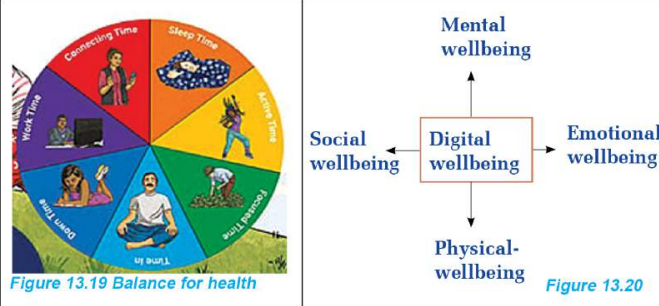
Digital Wellbeing: The state of being healthy mentally, physically, socially, and emotionally by balancing time spent on online and offline activities
Why Digital Wellbeing Matters
Health Problems from Excessive Screen Time:
Physical Issues:
- Obesity (lack of physical activity)
- Insomnia (sleep problems)
- Vision problems (eye strain)
- Poor posture
- Lack of exercise
Mental Issues:
- Mental stress
- Depression
- Anxiety
- Dishonesty
- Low self-esteem
Social/Emotional Issues:
- Social isolation
- Loneliness
- Aggressiveness
- Reduced face-to-face interaction
Four Dimensions of Digital Wellbeing
- Physical Wellbeing: Body health, exercise, sleep
- Mental Wellbeing: Psychological health, stress management
- Social Wellbeing: Relationships, interactions
- Emotional Wellbeing: Feelings, emotional balance
Time Balance Components
Daily Time Management:
- Sleep Time: Adequate rest
- Work Time: Productive activities
- Active Time: Physical exercise
- Focused Time: Concentrated work/study
- Down Time: Relaxation
- Connecting Time: Social interaction (online/offline)
Cautions for Digital Wellbeing
Activity 13.3: Self-Assessment
- Track household digital device usage
- Discuss long-term effects
- Note possible consequences
Problems from Digital Addiction
- Chaotic lifestyle
- Poor time management
- Health deterioration
- Relationship problems
Digital Wellbeing Skills Required
- Awareness of effects
- Understanding of unnecessary use consequences
- Self-regulation abilities
Healthy Habits to Develop
- Separate screen time
- Designated times for device use
- Screen-free periods
- Set time limits
- Specific duration for social media
- App timers
- Turn off notifications
- During work
- During study
- During sleep
- Regular breaks
- Eye rest
- Physical movement
- Stretching
Digital Wellbeing Applications
Purpose: Help reduce screen time and manage digital usage
Available Apps:
- Beta
- Action Dash
- Digital Detox
- Microsoft Launcher
- Digital Wellbeing (Android)
Features:
- Track daily usage time
- Show app-wise usage
- Set time limits
- Turn off notifications
- Schedule app usage
- Bedtime mode
Activity 13.4: Using Digital Wellbeing App
- Download from Play Store
- Install and open
- Observe daily usage statistics
- Set time limits
- Configure notifications
- Explore features
Educational Use of Digital Technology
Safe Internet Use for Learning
Resources:
- Educational websites
- Online courses
- Video tutorials
- Example: https://www.youtube.com/c/NCEDVirtual (audio-visual content for different subjects)
Caution: Maintain digital wellbeing while learning online
Creating Audio and Audio-Visual Materials
Audio Content Creation
Recording Method:
- Use computer microphone
- Use smartphone microphone
- Record sound directly
File Formats: MP3, WAV, WMA
Audio-Visual (Video) Content Creation
Recording Devices:
- Smartphone camera
- Digital camera
- Computer webcam
Activity 13.5: Video Recording Example
- Record spring balance with 500g mass
- Drop from height
- Record in slow motion
- Observe needle position
- Demonstrates scientific principle
Video File Formats:
- MP4: Most common
- 3GP: Mobile format
- SVI: Samsung video
- MOV: QuickTime format
Video Editing
Purpose of Video Editing
- Cut unnecessary segments
- Combine multiple clips
- Create complete video file
- Enhance quality
- Add effects
Software Options
Computer Software:
- Adobe Premiere Pro (Professional)
- Filmora (User-friendly)
- Windows Video Editor (Built-in)
Mobile Applications:
- Various apps available in Play Store
- Can be downloaded and installed
Video Editing Process (Activity 13.6)
Part (a): Video Cutting
Step-by-Step Process:
- Launch Video Editor
- Click search bar
- Type "Video Editor"
- Open application
- Create New Project
- Click "New video project"
- Type project name (e.g., "Class 10 ICT")
- Click OK
- Add Video
- Select video from computer memory
- Drag to project library
- Drag to editing panel
- Trim Video
- Select video in editing panel
- Click "Trim" button
- Play video to find cut points
- Set Cut Points
- Use two blue drag bars
- Set start time
- Set end time
- Check clip length
- Click "Done"
- Export Video
- Select cut clip
- Click "Finish video"
- Click "Export"
- Choose save location (e.g., Desktop)
- Save file
Part (b): Video Joining
Step-by-Step Process:
- Collect Clips
- Copy all clips to single folder
- Organize files
- Open Video Editor
- Launch software
- Create new project
- Add Multiple Files
- Select all videos to join
- Add to project library
- Drag all to editing panel
- Arrange Clips
- Order clips as desired
- Check transitions
- Join Videos
- Select all files in editing panel
- Click "Finish video"
- Export Combined Video
- Choose save location
- Export file
Mobile Video Editing
Process:
- Open video from gallery
- Click "Edit" icon
- Click "Cut" or "Crop" icon
- Make edits
- Save edited video
If No Editing App:
- Download from Play Store
- Install application
- Use for editing
Audio Editing
Similar Process to Video Editing
- Use audio editing software/applications
- Cut, trim, merge audio files
Audio File Formats
- MP3: Most common
- WAV: High quality
- WMA: Windows Media Audio
Software Options
Computer Software:
- Audacity (Free, professional)
- Download from: www.audacityteam.org
- MP3 Cutter
- Download from official sources via Google search
Mobile Applications:
- Available in App Store
- Available in Play Store
- Various options for different platforms
Download and Installation
- Search for software
- Download from official source
- Install on computer/smartphone
- Open and use for editing
Summary of Key Concepts
Signal Types
- Analog: Continuous, sine wave, -5V to +5V
- Digital: Discrete, square wave, 0V or 5V
TV Evolution
- Antenna TV → Cable TV → Dish TV
- Analog → Modulated signals → Digital signals
Digital Communication
- Better quality than analog
- Less affected by interference
- Requires larger bandwidth
- Enables coding and security
Transmission Types
- Baseband: Short distance, no modulation
- Broadband: Long distance, requires modulation
Digital Technology Impact
- Positive: Libraries, payments, business, entertainment
- Negative: Health issues, cybercrime, addiction
Digital Citizenship
- Netizen: Active internet user
- Requires etiquette and responsibility
- Online reputation matters
Digital Wellbeing
- Balance online/offline time
- Use wellbeing applications
- Maintain physical, mental, social, emotional health
Content Creation
- Audio recording and editing
- Video recording and editing
- Various software and apps available
Gallery
Baseband Broadcasting Channel
Baseband Broadcasting Channel
Digital Signal Transmission Process and Block Picture
Digital Signal Transmission Process and Block Picture
Conversion of signals
Conversion of signals
Cautions for Digital Wellbeing
Cautions for Digital Wellbeing