Introduction to QBASIC
What is QBASIC?
QBASIC stands for Quick Beginner's All-purpose Symbolic Instruction Code
Developed by: Microsoft Corporation
Year of Development: 1985
Type: High-level programming language
What is a High-Level Programming Language?
A high-level programming language is a language that:
- Uses English-like words and mathematical symbols
- Is easy for humans to read and write
- Is closer to human language than machine language
- Requires a compiler or interpreter to convert to machine language
Characteristics of QBASIC
Modular Programming Language:
- Programs can be divided into different modules or procedures
- Each module performs a specific task
- Makes programs organized and easy to manage
Simple and Easy to Learn:
- Designed for beginners
- Simple syntax and structure
- Good for learning programming concepts
English-like Keywords:
- Uses words like PRINT, INPUT, IF, THEN, ELSE
- Easy to understand and remember
Mathematical Symbols:
- Uses +, -, *, /, =, <, > for operations
- Familiar symbols make coding easier
Advantages of QBASIC
- Beginner-friendly and easy to learn
- Interactive programming environment
- Immediate execution and testing
- Good for teaching programming fundamentals
- Built-in help system
- No complex setup required
Different Control Statements in QBASIC
Control statements control the flow of program execution. There are two main types:
A. BRANCHING STATEMENTS
Branching statements allow the program to make decisions and execute different code based on conditions.
1. IF...ELSEIF...END IF Statement
Purpose: To execute different blocks of code based on multiple conditions
Syntax:
IF condition1 THEN statements ELSEIF condition2 THEN statements ELSEIF condition3 THEN statements ELSE statements END IF
Example:
IF condition1 THEN
statements
ELSEIF condition2 THEN
statements
ELSEIF condition3 THEN
statements
ELSE
statements
END IF
Example:
I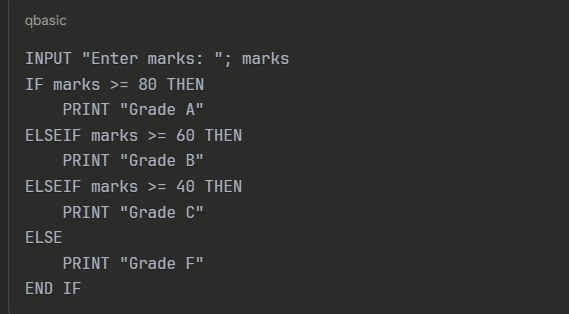 F"
F"
How it works:
- Checks condition1 first
- If condition1 is TRUE, executes its statements and exits
- If condition1 is FALSE, checks condition2
- Continues until a TRUE condition is found
- If no condition is TRUE, executes ELSE block
- END IF marks the end of the statement
2. SELECT CASE...END SELECT Statement
Purpose: To choose one option from multiple choices based on a single expression
Syntax:
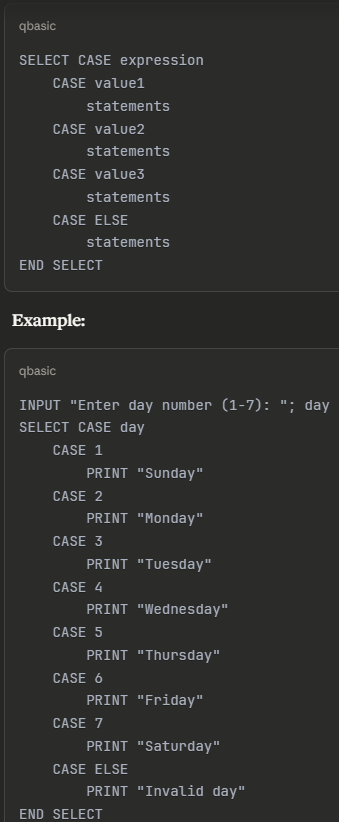
How it works:
- Evaluates the expression once
- Compares result with each CASE value
- Executes statements of matching CASE
- If no match found, executes CASE ELSE
- END SELECT marks the end
When to use SELECT CASE:
- When checking one variable against multiple values
- When you have many ELSEIF conditions
- Makes code cleaner and easier to read
B. LOOPING STATEMENTS
Looping statements repeat a block of code multiple times.
1. FOR...NEXT Statement
Purpose: To repeat code a specific number of times
Syntax:

Components:
- variable: Loop counter
- start: Starting value
- end: Ending value
- STEP: Increment value (optional, default is 1)
- NEXT: Marks end of loop
Example 1: Simple counting
FOR i = 1 TO 10
PRINT i
NEXT i
Output: 1 2 3 4 5 6 7 8 9 10
Example 2: Counting backwards
FOR i = 10 TO 1 STEP -1
PRINT i
NEXT i
Output: 10 9 8 7 6 5 4 3 2 1
Example 3: Even numbers
FOR i = 2 TO 20 STEP 2
PRINT i
NEXT i
Output: 2 4 6 8 10 12 14 16 18 20
How it works:
- Assigns start value to variable
- Checks if variable is less than or equal to end value
- Executes statements inside loop
- Increments variable by STEP value
- Repeats until variable exceeds end value
2. DO...LOOP Statement
Purpose: To repeat code while or until a condition is met
Four variations:
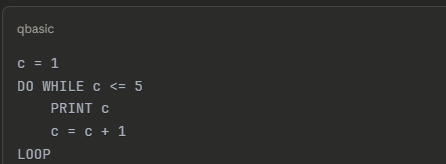
a) DO WHILE...LOOP (Pre-test loop)
DO WHILE condition statements LOOP
- Checks condition BEFORE executing statements
- If condition is FALSE initially, loop never executes
Example:
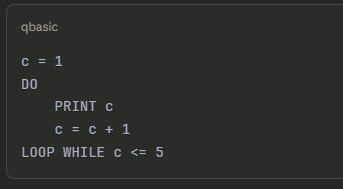
b) DO...LOOP WHILE (Post-test loop)
DO
statements LOOP
WHILE condition
- Executes statements first
- Then checks condition
- Executes at least once even if condition is FALSE
Example:
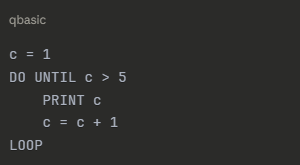
c) DO UNTIL...LOOP
DO UNTIL condition statements LOOP
- Continues until condition becomes TRUE
- Opposite of DO WHILE
Example:
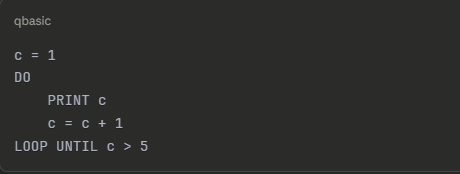
d) DO...LOOP UNTIL
DO statements LOOP UNTIL condition
- Executes at least once
- Continues until condition becomes TRUE
Example:
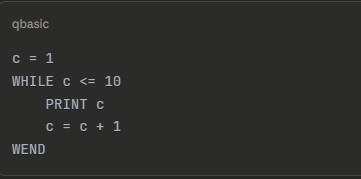
3. WHILE...WEND Statement
Purpose: To repeat code while a condition is TRUE
Syntax:
WHILE condition statements WEND
Example:
How it works:
- Checks condition first
- If TRUE, executes statements
- Returns to check condition again
- If FALSE, exits loop
- WEND marks the end of loop
Difference from DO...LOOP:
- WHILE...WEND is older syntax
- DO...LOOP is more flexible
- Both can achieve same results
Summary of Loop Differences
Loop TypeWhen to UsePre-test or Post-testFOR...NEXTKnown number of iterationsPre-testDO WHILE...LOOPCondition checked before executionPre-testDO...LOOP WHILECondition checked after executionPost-testDO UNTIL...LOOPContinue until condition is TRUEPre-testDO...LOOP UNTILContinue until condition is TRUEPost-testWHILE...WENDSimilar to DO WHILEPre-test
Library Functions in QBASIC
Library functions are pre-defined functions built into QBASIC.
String Functions
1. LEN() - Length Function
Purpose: Returns the number of characters in a string
Syntax: LEN(string)
Examples:
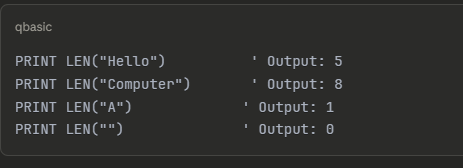 ' Output: 0
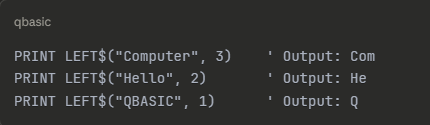
2. LEFT$() - Left String Function
Purpose: Extracts specified number of characters from the left side of a string
Syntax: LEFT$(string, n)
- string: source string
- n: number of characters to extract
Examples:
3. RIGHT$() - Right String Function
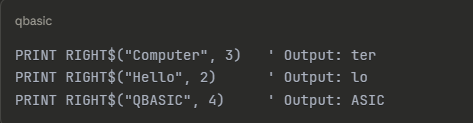
Purpose: Extracts specified number of characters from the right side of a string
Syntax: RIGHT$(string, n)
Examples:
4. MID$() - Middle String Function
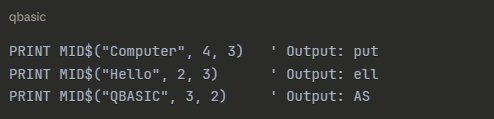
Purpose: Extracts characters from any position in a string
Syntax: MID$(string, start, length)
- string: source string
- start: starting position (1-based)
- length: number of characters to extract
Examples:
5. LCASE$() - Lower Case Function
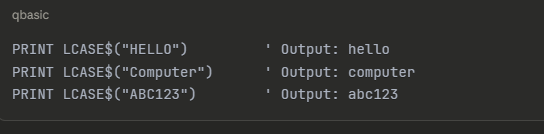
Purpose: Converts all letters in a string to lowercase
Syntax: LCASE$(string)
Examples:
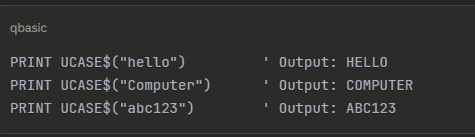
6. UCASE$() - Upper Case Function
Purpose: Converts all letters in a string to uppercase
Syntax: UCASE$(string)
Examples:
7. LTRIM$() - Left Trim Function
Purpose: Removes leading spaces from the left side of a string
Syntax: LTRIM$(string)
Examples:

Note: There is also RTRIM$() to remove trailing spaces from right
Conversion Functions
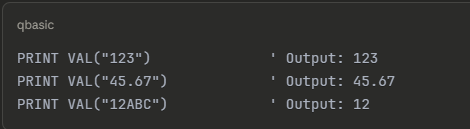
8. VAL() - Value Function
Purpose: Converts a numeric string to a numeric value
Syntax: VAL(string)
Examples:
Important:
- Converts string to number
- Stops conversion when non-numeric character is found
- Used when you need to perform calculations on string numbers
9. STR$() - String Function
Purpose: Converts a numeric value to a string
Syntax: STR$(number)
Examples:

Important:
- Adds a leading space for positive numbers
- Leading space is placeholder for sign
- Use LTRIM$(STR$(number)) to remove leading space
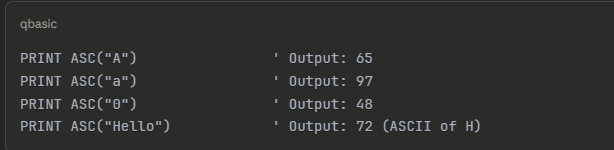
10. ASC() - ASCII Code Function
Purpose: Returns the ASCII code of the first character in a string
Syntax: ASC(string)
Examples:
ASCII Code Reference:
- A-Z: 65-90
- a-z: 97-122
- 0-9: 48-57
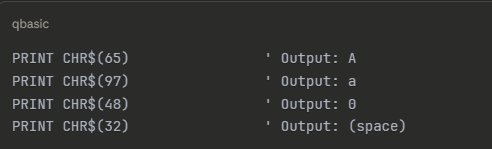
11. CHR$() - Character Function
Purpose: Returns the character corresponding to an ASCII code
Syntax: CHR$(code)
Examples:
Mathematical Functions
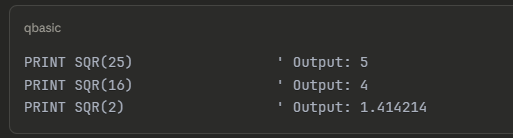
12. SQR() - Square Root Function
Purpose: Returns the square root of a number
Syntax: SQR(number)
Examples:
13. INT() - Integer Function
Purpose: Returns the largest integer less than or equal to a number (floor function)
Syntax: INT(number)
Examples:
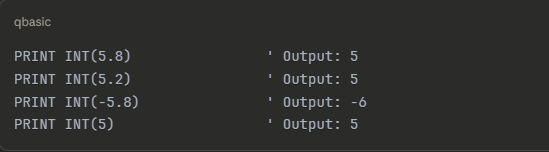
Important: For negative numbers, rounds DOWN (towards more negative)
14. FIX() - Fix Function
Purpose: Returns the integer portion of a number by removing the decimal part
Syntax: FIX(number)
Examples:
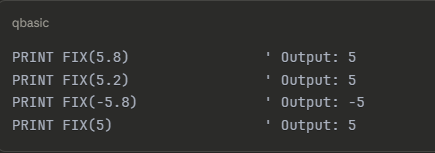
Difference between INT() and FIX():
- For positive numbers: Same result
- For negative numbers: Different results
- INT(-5.8) = -6
- FIX(-5.8) = -542