What is a Programming Language?
A programming language is a set of rules and words we use to tell a computer what to do. It's like giving instructions in a language the computer understands.
Key Terms Explained:
TermWhat It MeansSimple ExampleProgrammingWriting step-by-step instructions for computersLike writing a recipe for cookingProgrammerPerson who writes these instructionsThe chef who writes the recipeSyntaxGrammar rules of the programming languageIn English: "I am" not "Am I"
In programming: print() not pring()
Examples of Programming Languages:
- Python – Easy for beginners
- Java – Used for Android apps
- PHP – Used for websites
- C++ – Used for games
Remember: Every software you use (Windows, games, apps) is made with programming languages!
2. TYPES OF PROGRAMMING LANGUAGES
Two Main Types:
A. High-Level Programming Language
What it is: Languages that are easy for humans to read and write.
Characteristics:
- Looks like English words
- Easy to understand
- Need to be translated for computers
- Examples: Python, Java, PHP, C++
Example Code (Python):
python
print("Hello World")
B. Low-Level Programming Language
What it is: Languages that are close to what computers understand.
Characteristics:
- Mostly 0s and 1s (binary)
- Hard for humans to read
- Computers understand directly
- Examples: Machine language, Assembly
Example Code (Binary):

(This means "Hello" in binary!)
Comparison Table:
FeatureHigh-Level LanguageLow-Level LanguageEase of UseEasy for humansDifficult for humansSpeedSlower executionFaster executionUnderstandingNeeds translationDirectly understood by computerExamplePython, JavaMachine code (0101)UseApplications, websitesSystem software
Why the Difference Matters:
- High-level: We write in Python (easy for us)
- Computer understands: Binary (0101)
- Solution: Use translators to convert!
3. LANGUAGE TRANSLATORS
Why We Need Translators:
We write: print("Hello") ← Easy for us
Computer understands: 01001000... ← Binary
Translator converts human code → computer code
Two Main Types of Translators:
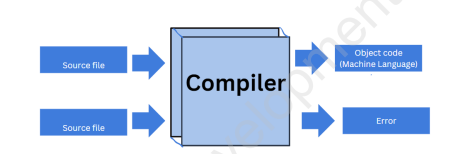
A. COMPILER
What it does: Translates the entire program at once.
How it works:

Features:
- Converts whole program
- Creates separate executable file (.exe)
- Shows all errors together
- Example: C, C++ compilers
Example:
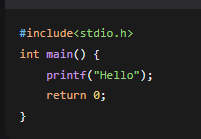
→ Compiler converts all → hello.exe → Run
B. INTERPRETER
What it does: Translates and executes line by line.
How it works:
text

Features:
- Translates line by line
- No separate file created
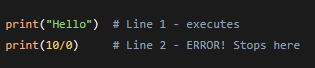
- Stops at first error
- Example: Python, JavaScript
Example:

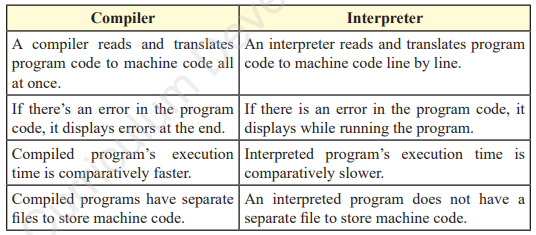
COMPILER vs INTERPRETER:
Simple Analogy:
Compiler = Translating a whole book at once
Interpreter = Translating sentence by sentence as you read
Introduction to Python
- Python is a high-level, interpreted programming language.
- Created by Guido van Rossum in 1991.
- Simple and readable syntax (like English).
- Versatile: Used for web development, data science, AI, automation, games, etc.
- Features:
- Easy to learn and write.
- Large standard library.
- Supports multiple paradigms (procedural, object-oriented).
Comments in Python
- Comments are notes ignored by the interpreter.
- Single-line comment: Starts with #
- Example: # This is a comment
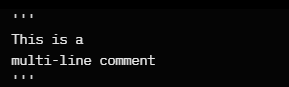
- Multi-line comment: Uses triple quotes ''' or """
- Example
Keywords in Python
- Reserved words with special meaning.
- Cannot be used as variable names.
- Examples: if, else, for, while, True, False, def, class, etc.
- Total around 35 keywords.
Input/Output Statements
- input(): Takes user input.
- Example: name = input("Enter your name: ")
- print(): Displays output.
- Example: print("Hello", name)
String Formatting in Python
- Old style (% operator): print("Name: %s" % name)
- .format() method: print("Name: {}".format(name))
- f-strings (recommended): print(f"Name: {name}")
Important Points to Remember
- Always plan with algorithm and flowchart before coding.
- Python is beginner-friendly – great for starting programming!
Iteration (Loops)
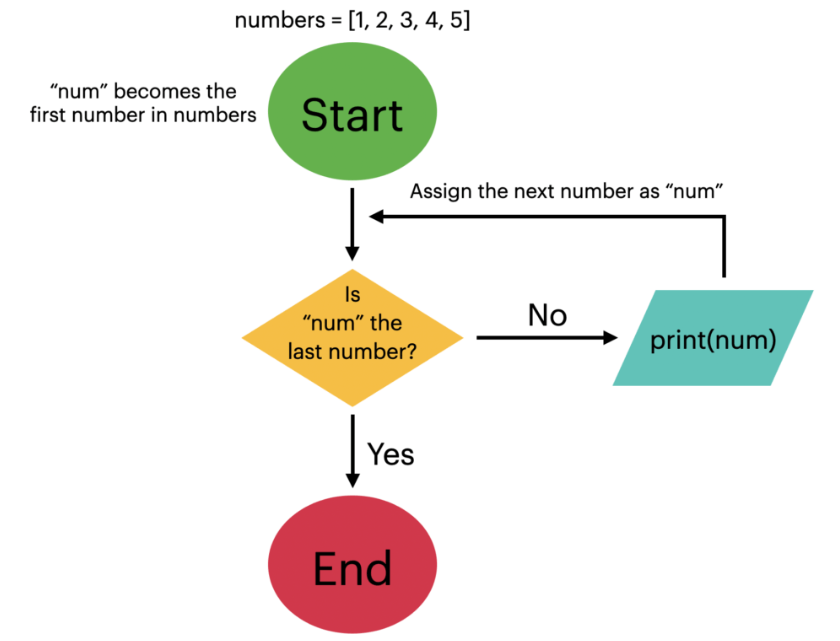
- Iteration means doing things repeatedly. It is the process of repeating a particular task until a specified condition is satisfied.
- It allows a program to perform a task multiple times until a required condition is satisfied.
- Iteration is like having a helper that repeats tasks for you, making your program more efficient and saving you from writing the same thing repeatedly.
- The most fundamental examples of iteration are the “for” loop and “while” loop.
For Loop
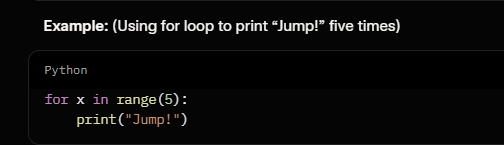
- “For loop” is used when we know how many times we want to repeat a block of code.
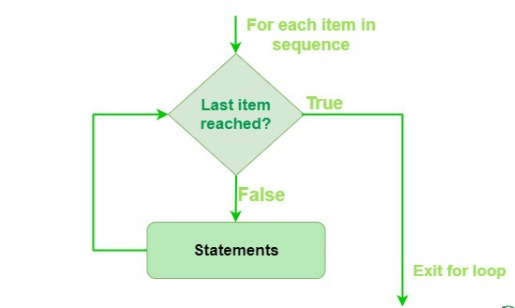
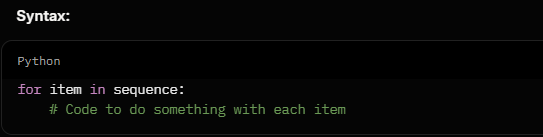
- A for loop in Python is a control flow structure that allows us to iterate over a sequence.
- It simplifies the process of repeatedly executing a set of statements for each item in the sequence.
- The basic idea is to loop through each element in the sequence, executing a block of code for each iteration.
- The for loop is particularly useful when the number of iterations is known.
- “for” keyword is used in the for loop to give the condition.
Range Function:
- In Python, range is a function that helps you make a list of numbers in a certain order.
- It returns a sequence of numbers, starting from 0 by default and increments by 1 (by default), and stops before a given number by user.
While Loop
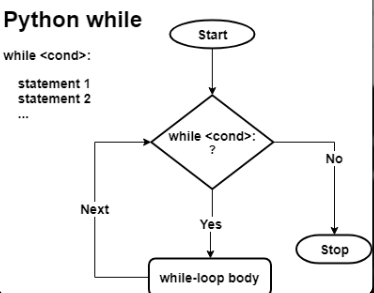
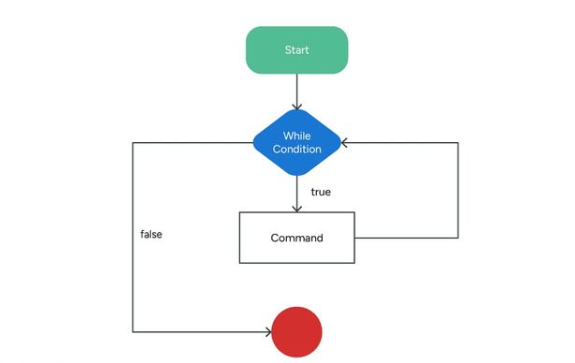
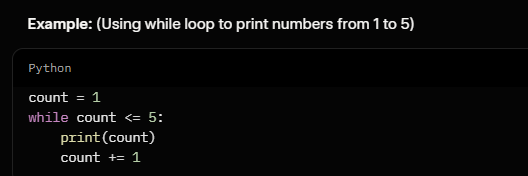
- “While loop” in Python is a control structure that allows us to repeatedly execute a block of code as long as certain conditions remain true.
- It's like having a set of instructions for a computer to keep doing something over and over until a specific goal is achieved or a condition is no longer met.
- It provides a flexible way to handle tasks where the number of iterations is not known in advance.
Syntax:
while condition:
# Code to be executed while the condition is true
# This code is indented and forms the body of the loop
# It continues executing as long as the condition remains true
# Remember to update the condition to eventually become false, or you might end up with an infinite loop
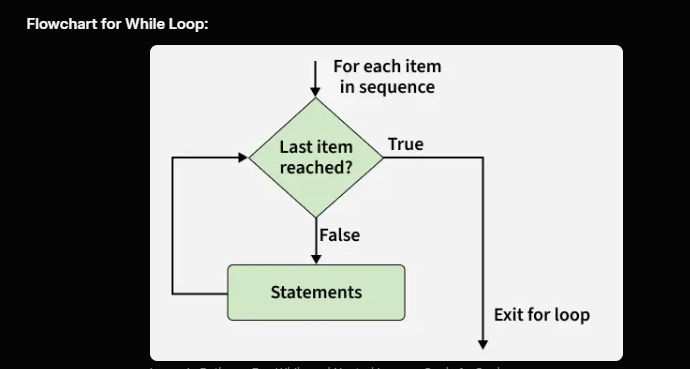 For LoopWhile LoopFor loop is used when we know the number of iterations.While loop is used when we don't know the number of iterations.This loop iterates an infinite number of times if the condition is not specified.If the condition is not specified, it shows compilation error.The increment is done after the execution of the statement.The increment can be done before or after the execution of a statement.The nature of increment is simple.The nature of increment is complex.Initialisation can be in or out of the loop.Initialisation is always out of the loop.
4. PROGRAMMING TOOLS: ALGORITHM & FLOWCHART
A. ALGORITHM
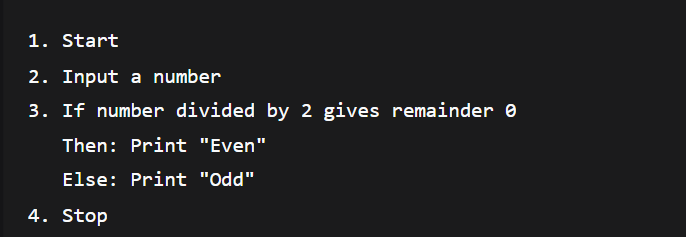
What is it? A step-by-step method to solve a problem.
Think of it as: A recipe for cooking
Characteristics of Good Algorithm:
- Clear – Easy to understand
- Step-by-step – One thing at a time
- Finite – Must end eventually
- Effective – Should solve the problem
Example Algorithm: Make Tea

Example Algorithm: Check Even or Odd Number
B. FLOWCHART
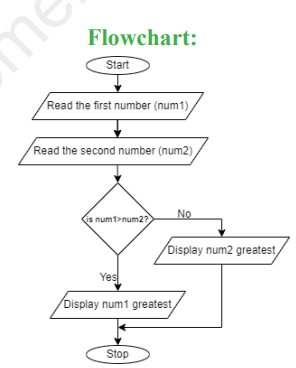
What is it? A picture/diagram of an algorithm.
Why use it? Visual representation is easier to understand than text.
Flowchart Symbols:
SymbolNamePurposeExample○TerminalStart/End of programStart, Stop▭ProcessAny action/calculationAdd A and B◇DecisionYes/No questionIs A > B?▱Input/OutputGet input or show outputInput number, Print result→FlowlineShows directionArrow between steps◯ConnectorConnect different partsUsed in complex flowcharts
How to Draw a Flowchart:
- Start with ○ (Start)
- Use ▱ for input
- Use ◇ for decisions
- Use ▭ for processes
- Use → to connect
- End with ○ (Stop)
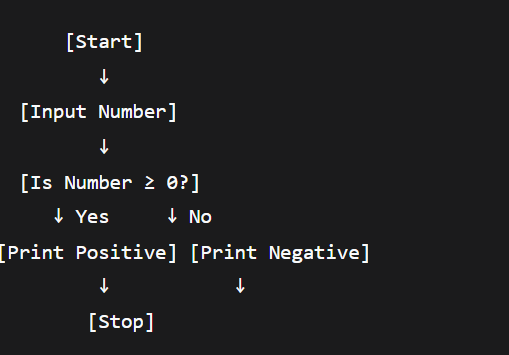
Example Flowchart: Check Positive/Negative Number
Advantages of Flowcharts:
✅ Easy to understand
✅ Helps find mistakes
✅ Good documentation
✅ Helps in coding
Disadvantages of Flowcharts:
❌ Time-consuming for big programs
❌ Difficult to modify
❌ No standard size for symbols
5. HOW THESE CONCEPTS WORK TOGETHER
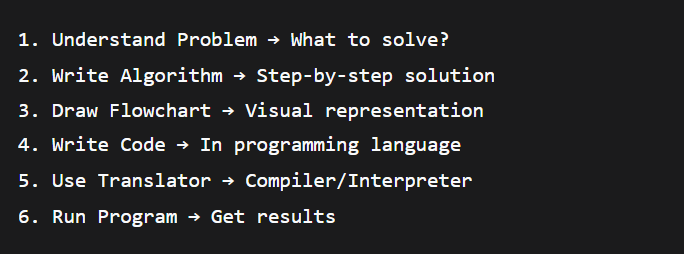
Complete Programming Process:
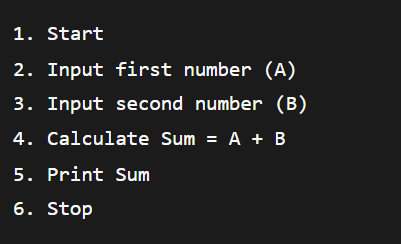
Real Example: Calculate Sum of Two Numbers
Step 1: Algorithm
Step 2: Flowchart
text

Step 3: Code (Python)

Step 4: Translation
Python Interpreter → Converts to machine code → Runs
6. IMPORTANT POINTS TO REMEMBER FOR EXAM
Must-Know Definitions:
Programming = Writing instructions for computers
High-level language = Easy for humans (Python)
Low-level language = Easy for computers (Binary)
Compiler = Translates entire program
Interpreter = Translates line by line
Algorithm = Step-by-step solution
Flowchart = Picture of algorithm