1. Introduction to Internet and Social Media
What is the Internet?
The internet is a global network of interconnected computers and devices that allows communication, data exchange, and access to information worldwide. It enables users to connect, share, and access resources from anywhere at any time.
Evolution of Communication:
- Past: Letters, newspapers, telegrams (slow, limited reach)
- Present: Internet, email, social media (instant, global reach)
2. Key Concepts and Components
A. World Wide Web (WWW)
- Collection of interlinked hypertext documents accessed via the internet
- Invented by Tim Berners-Lee in 1989 at CERN, Switzerland
- Allows access to websites, documents, and multimedia content
B. Web Browser
- Software application used to access and view websites
- Examples: Google Chrome, Mozilla Firefox, Safari, Microsoft Edge
- First web browser: Mosaic (1993)
C. Search Engine
- Tool that helps find information on the internet using keywords
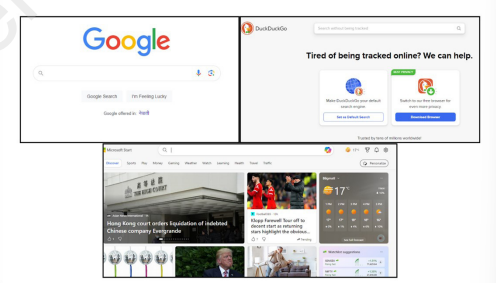
- Examples: Google, Bing, Yahoo, DuckDuckGo
- Uses algorithms to provide relevant results
- Specialized search engine: KidRex (for children)
Search Techniques:
- Boolean Operators: AND, OR, NOT (refine searches)
- Quotation Marks: "exact phrase"
- Filetype Search: filetype:pdf
- Site Search: site:wikipedia.org
- Wildcard: * (e.g., "comput*" finds computer, computing, etc.)

D. URL (Uniform Resource Locator)
- Web address that identifies a specific resource on the internet
- Structure: https://www.example.com/path
Protocol: https://
Domain: www.example.com
Top-Level Domain (TLD): .com, .org, .edu, .np
Path: /path (specific page or resource)
3. Remote Login
What is Remote Login?
- Accessing and controlling a computer from another location via the internet
- Useful for technical support, remote work, file access
Remote Login Software:
- AnyDesk: Lightweight, fast remote access
- TeamViewer: Comprehensive with meeting features
- Remote Desktop Connection (Windows built-in)
How It Works:

4. Web Protocols
What are Protocols?
- Rules and standards that govern data communication over networks
- Ensure efficient, secure, and reliable data transfer
Common Web Protocols:
ProtocolFull FormPurposeSecurityHTTPHypertext Transfer ProtocolTransfer web pagesNot secureHTTPSHypertext Transfer Protocol SecureSecure transfer of web pagesEncrypted, secureFTPFile Transfer ProtocolTransfer files between computersVariesSMTPSimple Mail Transfer ProtocolSend emailsCan be securePOP3/IMAPPost Office Protocol/Internet Message Access ProtocolReceive emailsCan be secure
HTTP vs HTTPS:
- HTTP: Data sent in plain text, vulnerable to interception
- HTTPS: Encrypted data transmission, shows padlock in browser
- Always look for: https:// and padlock icon for secure sites
5. Email and Its Uses
What is Email?
- Electronic mail for sending digital messages via the internet
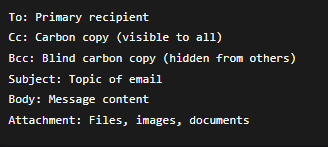
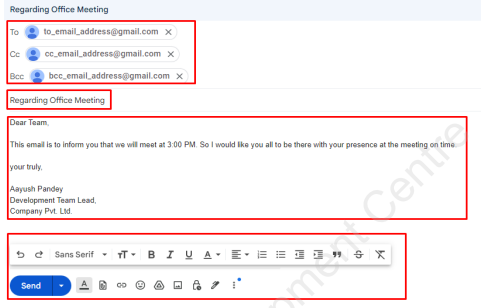
- Components: Sender, Recipient, Subject, Body, Attachments

Email Structure:
Email Actions:
- Reply: Respond to sender
- Reply All: Respond to all recipients
- Forward: Send to new recipients
- Attach: Add files
- Mark as Spam: Report unwanted email
Uses of Email:
- Personal Communication: Stay in touch with friends/family
- Education: Submit assignments, communicate with teachers
- Business: Professional communication, transactions
- Marketing: Newsletters, promotions, surveys
- Entertainment: Fan clubs, updates, subscriptions
Email Etiquette:
- Clear subject line
- Professional greeting and closing
- Check spelling and grammar
- Use appropriate tone
- Don't share sensitive information
6. Social Media
What is Social Media?
- Online platforms for sharing content, connecting, and communicating
- Enables real-time interaction and community building
Popular Social Media Platforms:
- Facebook: General social networking
- Instagram: Photo and video sharing
- Twitter/X: Short messages and news
- WhatsApp: Instant messaging
- LinkedIn: Professional networking
- Snapchat: Temporary photo/video sharing
- TikTok: Short video content
Pros of Social Media:
✅ Global connectivity and communication
✅ Information sharing and awareness
✅ Business and marketing opportunities
✅ Educational resources and learning
✅ Creative expression and community building
✅ Real-time news and updates
Cons of Social Media:
❌ Cyberbullying and harassment
❌ Privacy concerns and data theft
❌ Spread of misinformation
❌ Addiction and time wastage
❌ Mental health issues (anxiety, depression)
❌ Body image issues and social comparison
Safe Social Media Practices:
- Use strong, unique passwords
- Adjust privacy settings
- Think before posting
- Don't share personal information
- Report abusive behavior
- Verify information before sharing
- Limit screen time
Cyber Bureau of Nepal:
- Website: www.nepalpolice.gov.np
- Purpose: Handle cybercrime complaints and investigations
- Contact: Through local police stations or online portal
7. Online Video Meetings
What are Online Video Meetings?
- Virtual face-to-face communication using audio, video, and screen sharing
- Enable remote collaboration, classes, and conferences
Popular Video Meeting Platforms:
- Zoom: Popular for education and business
- Google Meet: Integrated with Google Workspace
- Microsoft Teams: Business collaboration
- Skype: Personal and business calls
- Webex: Enterprise meetings
Video Meeting Etiquette:
- Be punctual: Join on time
- Dress appropriately: Professional attire
- Mute when not speaking: Reduce background noise
- Use appropriate background: Neutral or virtual
- Maintain eye contact: Look at camera
- Participate actively: Engage in discussion
- Be respectful: Listen to others, don't interrupt
First Video Call: June 30, 1970, between Pittsburgh Mayor and Alcoa CEO
8. Blogs and Their Features
What is a Blog?
- Online journal or informational website with regular entries (posts)
- Can be personal, professional, or topic-specific
Features of Blogs:
- Posts: Individual articles or entries
- Authorship: Written by individuals or teams
- Comments: Reader interaction and discussion
- Categories: Organized by topics
- Archives: Historical posts accessible by date
- Tags: Keywords for searchability
- Multimedia: Images, videos, audio
- Social Sharing: Share buttons for social media
- Subscription: Follow for updates
- Search Function: Find specific content
Types of Blogs:
- Personal blogs (diaries, experiences)
- Professional blogs (expertise sharing)
- Business blogs (marketing, updates)
- Educational blogs (tutorials, resources)
- News blogs (current events)
Blogging Platforms:
- WordPress
- Blogger
- Medium
- Wix
- Squarespace
Creating a Blog:
- Choose a platform
- Select a domain name
- Customize design/template
- Write and publish content
- Promote through social media
- Engage with readers
9. Practical Skills and Activities
A. Email with Digital Signature
Steps in Gmail:
- Go to Settings → See all settings
- Click General → Signature
- Create new signature
- Add name, contact, position
- Save changes
B. Effective Internet Searching
- Use specific keywords
- Apply search operators
- Evaluate source credibility
- Use multiple search engines
- Check date of information
C. Creating Social Media Profiles
Steps:
- Choose platform
- Sign up with email/phone
- Complete profile information
- Add profile picture and cover
- Adjust privacy settings
- Start connecting/ following
D. Setting Up Video Meetings
Using Zoom:
- Sign up/create account
- Schedule meeting
- Share meeting link
- Start meeting at scheduled time
- Manage participants
- Record if needed
E. Creating a YouTube Channel
Steps:
- Sign in with Google account
- Go to YouTube → Create channel
- Customize channel art and info
- Upload videos with titles/descriptions
- Engage with viewers through comments
- Promote on other platforms
10. Digital Citizenship and Ethics
Responsible Internet Use:
- Respect others' privacy and opinions
- Give credit for shared content
- Avoid plagiarism and copyright violation
- Report inappropriate content
- Protect personal information
- Think before posting
Cyber Ethics Guidelines:
- Be honest and truthful online
- Respect intellectual property
- Maintain privacy and confidentiality
- Use appropriate language
- Help create positive online communities
- Follow platform rules and guidelines
11. Important Definitions
- Internet: Global network of connected computers
- WWW: Collection of interlinked web documents
- Web Browser: Software to access websites
- Search Engine: Tool to find online information
- URL: Web address specifying resource location
- Remote Login: Accessing computer from another location
- Protocol: Rules for data communication
- Email: Electronic mail messaging
- Social Media: Online interaction platforms
- Blog: Online journal with regular posts
- Digital Citizenship: Responsible technology use
- Cyber Ethics: Moral principles for online behavior
12. Key Points to Remember
✅ The internet connects people and information globally
✅ Always use HTTPS for secure browsing
✅ Social media requires responsible use and privacy settings
✅ Email is formal communication - use proper etiquette
✅ Video meetings need preparation and professionalism
✅ Blogs are powerful tools for sharing knowledge
✅ Report cybercrimes to Cyber Bureau of Nepal
✅ Digital footprint is permanent - think before posting
13. Safety Tips for Internet Use
- Verify Sources: Check information credibility
- Strong Passwords: Use unique, complex passwords
- Privacy Settings: Adjust on all social platforms
- Avoid Sharing: Personal details, location, financial info
- Update Software: Keep systems and apps updated
- Use Antivirus: Protect against malware
- Report Issues: Cyberbullying, harassment, scams
- Educate Yourself: Stay informed about online risks