1. Introduction to Web Technology
What is Web Technology?
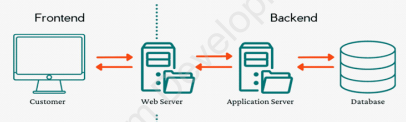
Web technology refers to the collection of tools, programming languages, software, and protocols used to create, develop, and manage websites and web applications on the internet. It combines both front-end (what users see) and back-end (server-side processing) components to deliver functional and interactive web experiences.
Key Components of Web Technology:
- HTML – Structures web content
- CSS – Styles and designs web pages
- JavaScript – Adds interactivity
- Backend Languages (PHP, Python, Node.js) – Handles server-side logic
- Databases (MySQL, MongoDB) – Stores website data
2. Web Development Life Cycle (WDLC)
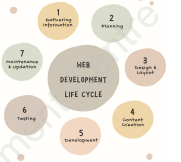
The WDLC is a systematic process for creating and maintaining websites.
Stages of WDLC:
StageDescription1. Gathering InformationResearch target audience, content needs, website purpose2. PlanningCreate sitemap, wireframes, and project timeline3. Design & LayoutDesign visual elements, choose colors, fonts, images4. Content CreationWrite text, prepare images, videos, and audio5. DevelopmentWrite code (HTML, CSS, JavaScript) to build the website6. TestingCheck for errors, broken links, browser compatibility7. Maintenance & UpdatingRegular updates, security patches, content refresh
Future Trends in Web Technology:
- AI and Machine Learning integration
- Progressive Web Apps (PWAs)
- Augmented Reality (AR) and Virtual Reality (VR)
- Edge Computing for faster performance
- Enhanced Web Security
3. Domain Name System (DNS)
What is DNS?
DNS is like the internet's phonebook. It translates human-readable domain names (e.g., www.google.com) into IP addresses that computers understand (e.g., 142.250.185.206).
Types of Domain Names:
- .com – Commercial websites
- .edu – Educational institutions
- .gov – Government organizations
- .org – Non-profit organizations
- .np – Country code for Nepal
- .net – Network-related sites
DNS Registration Process:
- Choose a unique domain name
- Check availability using a domain checker
- Select a registrar (e.g., nestnepal.com)
- Purchase and register the domain
- Renew before expiration
Note: In Nepal, .np domains can be registered freely at register.com.np
4. Concept of UI/UX Design
Front-End vs Back-End:
Front-EndBack-EndWhat users see and interact withServer-side processing and logicIncludes UI/UX, layouts, colorsIncludes databases, servers, APIsBuilt with HTML, CSS, JavaScriptBuilt with PHP, Python, Java, Node.jsUser-focusedFunctionality-focused
UI (User Interface):
- Focuses on visual elements: buttons, colors, typography, layouts
- Goal: Create attractive, user-friendly interfaces
- Tools: Figma, Adobe XD, Sketch
UX (User Experience):
- Focuses on user satisfaction and ease of use
- Goal: Make websites intuitive and enjoyable
- Involves: User research, wireframing, testing
Wireframing:
- A basic blueprint/skeleton of a webpage
- Shows structure without colors or detailed design
- Used in early design stages
- Tools: Balsamiq, Figma, Sketch
Benefits of Good UI/UX:
- Increases user engagement
- Improves user satisfaction
- Enhances brand identity
- Saves development time and cost
5. HTML (HyperText Markup Language)
Introduction to HTML:
- Created by Tim Berners-Lee in 1991
- Standard language for creating web pages
- Uses tags enclosed in angle brackets: <tag>
- File extension: .html or .htm
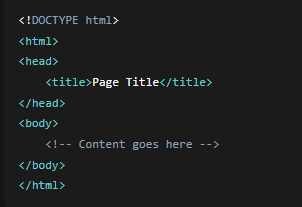
HTML Document Structure:
HTML Tags Types:
TypeDescriptionExampleContainer TagsHave opening and closing tags<p> </p>Empty TagsSelf-closing, no closing tag<br>, <img>
Common HTML Tags:
TagPurpose<h1> to <h6>Headings (h1 largest, h6 smallest)<p>Paragraph<br>Line break<hr>Horizontal line<b>, <i>, <u>Bold, Italic, Underline<sup>, <sub>Superscript, Subscript<font>Text font, size, color<marquee>Scrolling text or images<a href="">Hyperlink<img src="">Insert image<table>, <tr>, <td>Create tables<ul>, <ol>, <li>Lists (unordered, ordered)<form>Create forms for user input
HTML Attributes:
- Provide additional information about tags
- Placed within opening tag
- Format: attribute="value"
Example: <font color="red" size="5">
Color Codes in HTML:
- Use color names or hexadecimal codes
- Black: #000000
- Red: #FF0000
- Green: #00FF00
- Blue: #0000FF
6. Advanced HTML Elements
Anchor Tags (Links):

Attributes:
- href: Specifies the link destination
- target: Where to open the link (_blank, _self, _parent, _top)
Types of Links:
External Links: Link to different websites
Internal Links: Link within same page (#section)
Email Links: mailto:email@example.com
HTML Tables:

Table Attributes:
border: Border thickness
bgcolor: Background color
cellpadding: Space between cell content and border
cellspacing: Space between cells
colspan: Merge columns
rowspan: Merge rows
HTML Forms:

Form Elements:
- Text fields: <input type="text">
- Password: <input type="password">
- Radio buttons: <input type="radio">
- Checkboxes: <input type="checkbox">
- Dropdown: <select> with <option>
- Text area: <textarea>
- Buttons: Submit and Reset
DIV Tag:
- A container to group HTML elements
- Used for layout and styling with CSS
- Block-level element
7. CSS (Cascading Style Sheets)
Introduction to CSS:
Styles HTML elements
Separates content from presentation
Can control layout, colors, fonts, responsiveness
Types of CSS:
TypeWhere DefinedExampleInline CSSWithin HTML tag<p style="color:red;">Internal CSSInside <style> in <head>p {color: red;}External CSSSeparate .css file linked<link rel="stylesheet" href="style.css">
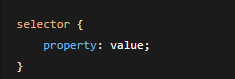
CSS Syntax:
CSS Selectors:
SelectorSyntaxTargetsElementp { }All <p> elementsID#header { }Element with id="header"Class.menu { }Elements with class="menu"Universal* { }All elements
Common CSS Properties:
PropertyValuesPurposecolorred, #FF0000Text colorfont-familyArial, TimesFont typefont-size16px, 1emText sizebackground-coloryellow, #FFFF00Background colortext-alignleft, center, rightText alignmentmargin10px, 2emOuter spacepadding5pxInner spaceborder1px solid blackBorder style
CSS Box Model:
Content – Actual text/image
Padding – Space around content
Border – Line around padding
Margin – Space outside border
8. Practical Applications & Projects
Creating a Basic Web Page:
- Plan structure and content
- Write HTML code
- Add CSS for styling
- Test in different browsers
- Upload to web server
Project: Personal Portfolio Website
Pages Required:
- Home Page – Introduction, welcome message
- Gallery Page – Photos with captions
- Contact Page – Contact form with fields
- Information Page – Personal details in table
Features to Include:
- Navigation bar on all pages
- Consistent footer with contact info
- Responsive design for mobile
- Forms with validation
- Images and multimedia content
Web Development Tools:
- Text Editors: Sublime Text, VS Code, Notepad++
- Browsers: Chrome, Firefox, Safari (for testing)
- FTP Clients: FileZilla (for uploading to server)
9. Important Definitions
- HTML – HyperText Markup Language, structures web pages
- CSS – Cascading Style Sheets, styles web pages
- DNS – Domain Name System, translates domain to IP
- UI – User Interface, visual design of website
- UX – User Experience, how users interact with site
- Wireframe – Basic layout blueprint
- Responsive Design – Website adapts to different screen sizes
- Front-End – Client-side development (what users see)
- Back-End – Server-side development (logic and data)
- Web Protocol – Rules for data transfer (HTTP, HTTPS)
10. Key Points to Remember
✅ HTML is for structure, CSS is for style
✅ Always test websites in multiple browsers
✅ Keep backup copies of your work
✅ Use meaningful names for files and folders
✅ Practice by creating simple projects first
✅ Learn from existing websites (View Source)
✅ Stay updated with latest web technologies
11. Safety & Ethics in Web Development
- Respect Copyrights – Don't copy others' work without permission
- Protect User Data – Handle personal information securely
- Test Thoroughly – Ensure your site works correctly
- Credit Sources – Acknowledge where you get resources
- Keep Learning – Web technology evolves rapidly