Introduction
Programming becomes messy when everything is written in one giant block. To avoid chaos, programmers break a big program into smaller, meaningful pieces.
This idea is called Modular Programming.
In modular programming:
A big program is divided into modules (small blocks).
Each module performs a specific task.
There is always one main module and many optional sub-modules.
A module is also called a procedure.
This makes programs easier to read, understand, test and reuse.
Advantages of Modular Programming
Different programmers can work on different modules at the same time.
Errors are easier to find and fix.
Same module can be used again in other parts of the program.
The program becomes clear and easier to read.
Designing, modifying and updating code becomes simple.
Main Module and Sub-Modules
Main Module: The starting part of the program.
Sub Modules: Smaller blocks created to perform special tasks (like calculating, printing, checking, etc.)
Diagram:
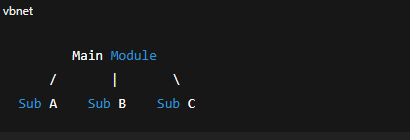
Modular Programming in QBASIC
QBASIC supports modular programming in 2 ways:
Sub-procedure (SUB…END SUB)
Function-procedure (FUNCTION…END FUNCTION)
A) SUB-PROCEDURE
What is a Sub-procedure?
A sub-procedure is a small part of a program that performs a task but does NOT return any value to the main module.
Written as:
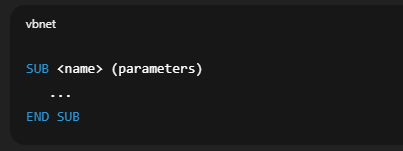
A sub-procedure must be:
Declared
Defined
Called
1. Declaration Part
Before using a sub-procedure, we declare it using DECLARE SUB.
Syntax:
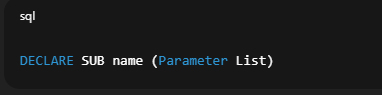
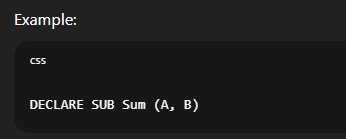
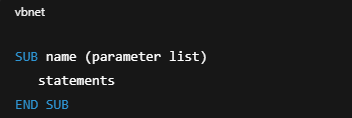
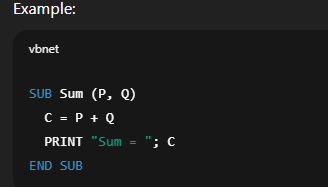
2. Definition Part
This is the block where we write the actual code for the sub-procedure.
Syntax:
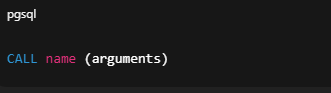
3. Calling the Sub-Procedure
We use CALL from the main module.
Syntax:
Example:

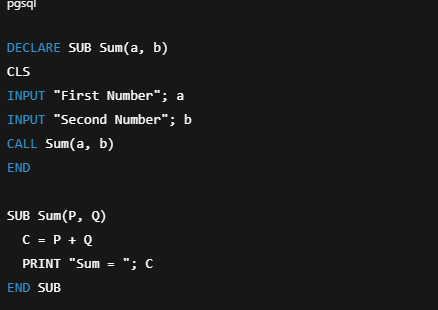
Complete Example (Sum of Two Numbers)
Call by Reference and Call by Value
1. Call by Reference (Default)
The memory address of the variable is passed.
Changes in sub-module affect main-module.
Example Output: 15 10
2. Call by Value
Only the value is sent.
Changes inside sub-module DO NOT affect main module.
Done by using double parentheses.
Example Output: 5
Formal Parameter vs Actual Parameter
Formal Parameters:
Variables used in the DECLARE and SUB/FUNCTION definition.
Actual Parameters:
Real values passed during CALL (from main program).
Local and Global Variables
Local Variable
Declared inside a module.
Only works inside that module.
Global Variable
Can be used in all modules.
Declared using:
COMMON SHARED (main module)
DIM SHARED (main module)
SHARED (inside sub-module)
Examples of Sub-Procedures
Area of Circle
Multiplication Table
Odd/Even Check
First 10 Natural Numbers
Palindrome Check
Area and Volume of Room
(These are already included above; rewritten explanations available if needed.)
B) FUNCTION-PROCEDURE
Functions are like small machines that:
Take input (parameters)
Perform calculation
Always return a value
Written as:
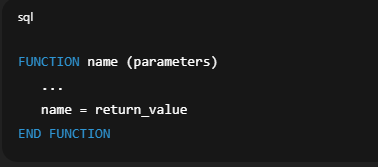
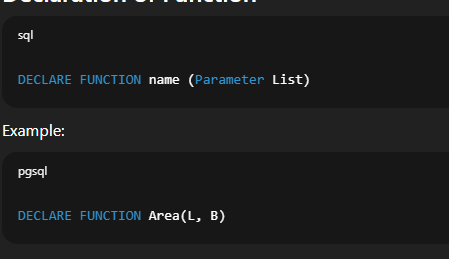
Declaration of Function
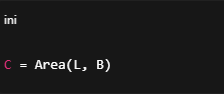
Calling a Function
Two ways:
1. Assign to variable
2. Print directly

Example (Area of Rectangle)
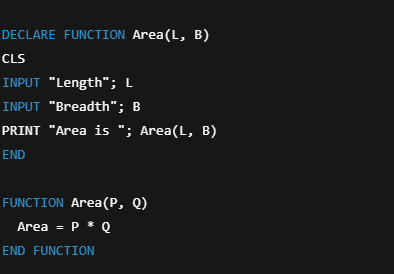
Examples of Function Procedures
Simple Interest
Circumference
Smallest Number
Vowel Count
Sum of Digits
Reverse String
Area and Volume
Summary (Exam-Focused Points)
Modular programming means writing programs in multiple modules.
Two kinds of modules in QBASIC:
Sub-Procedure (no return value)
Function-Procedure (returns value)
DECLARE SUB and CALL are used for sub-procedures.
DECLARE FUNCTION and assignment/PRINT are used for functions.
Sub-procedure uses SUB…END SUB.
Function uses FUNCTION…END FUNCTION.
Formal parameters: used during declaration/definition.
Actual parameters: used during CALL.
Local variables: work only inside the module they are declared.
Global variables: accessible from all modules using SHARED.